Friday, 28 August 2015

Java interview questions - level easy

This is the first of a series of three articles I want to put together around some Interview questions that could be used for interviewing Java developers. In this first article, we will look at easier, basic concepts that should be covered in any introduction to Java programming. So many of the questions will deal with concepts around defining and declaring classes

  1. What is the difference between an interface and an abstract class?
    An interface is just a contract with no implementation. All methods in an interface are public and abstract. An abstract class can have some state and implementation.
  2. What are the main differences between Java and C++?
    Java is compiled to platform independent byte code that is interpreted in a virtual machine. C++ is compiled into native binaries that are not portable. Java gives automatic memory management. C++ memory management is handled by the programmer.
  3. What is the difference between a while statement and a do statement?
    A while statement may not execute, a do statement is guaranteed to execute at least once.
  4. Explain the main() method in a java program?
    What is passed to it and what is its return type? The main method is the starting point for a java application. The return type is void and the arguments to the java application are passed in an array of Strings to the main method.
  5. What's the first thing that happens in a constructor?
    The first call of every constructor must be a call to super() or this(), but never both in the same constructor. If you call this(), eventually super() must be called.
  6. What access can classes have?
    public or default. protected and private are also only allowed on methods and instance variables.
  7. What modifiers can classes have? abstract, final or strictfp
  8. What types are allowed to be in a case statement?
    byte, char, short, int and enum. In java 7 we can also switch on String
  9. Interfaces allow inheritance so can an interface have protected methods?
    No, an interface can only have public abstract methods. Update for Java 8, interfaces can now have default method implementations.
  10. Java concept of the day 25 basic questions
  11. Java concept of the day

Monday, 10 August 2015

Object Oriented Design

This short article revisits the first principles of Object Oriented Design

  1. Why is OO design better than normal procedural coding languages like Bash or C? There are a few reasons. Application code structure and naming should map more readily to real world concepts. Object Oriented design lends itself to more naturally cohesive components (related data and methods are collocated). Thanks to encapsulation, we can reduce coupling. Through the concepts of polymorphism and inheritance we can promote reuse.
  2. Explain encapsulation? The state of an object should be hidden and only manipulated by methods. The advantage here is that it allows the implementation with in the object to be changed over time without impacting components that depend on this component.
  3. What is inheritance? Classes can automatically obtain the functionality and state of a parent class. This is also known as sub classing. Inheritance is usually applied for "is a" type relationships. For example if the base class is Car, Corolla is a type of car so Corolla extends Car and automatically gets it's methods and state.
  4. What is polymorphism? This means where a parent class is used we can easily interchange objects of a sub class. For example if if we have a container that holds objects of type Car, then instances of Corolla and Golf can be added to the container. Polymorphism works best when you understand the Liskov Substitution Principle.
  5. Explain the concept of dependency? Dependency means that a relationship exists between one or more components. Dependency can be explicit or direct, for example an import statement at the top of a Java class definition. Or Dependency can be implicit or indirect for example two components know the format of an XML document. Generally we favour components that have a lower number of dependencies on other components. And we favour explicit dependencies that are loosely coupled. Coupling is used to classify the strength of the dependency.
  6. Explain the concept of Coupling? Coupling is the measure of the dependency relationship between two components. Coupling can be tight, where a change in a class has a knock on change in another class. For example Where a component depends on the internal data fields of another component. Loose coupling means that a component depends on behaviour of another component.
  7. Should software components be tightly or loosely coupled? Good software components should favour loose coupling. In loose coupling, components depend on methods of other components. This means the internals of a component can be changed in isolation - once the contract on the interface is maintained. Tight coupling means that data fields or structure can't be changed in isolation of other components.
  8. Explain cohesion? Cohesion is how logically related are software elements that are contained with in a software component. Highly cohesive components are better. Low cohesive components should be split into further components to promote reuse and reduce coupling.
  9. Are getters and setters "evil"? Short answer yes. Because it breaks encapsulation. Breaking encapsulation means your class is less maintainable in the future. Exposing state to other classes means other classes can contain logic that manipulates the state. Go here for a good exploration of this concept. Systems that use getters and setters are object based, but not object oriented.
Original article 10th August, 2015.
Updated 22nd October, 2015 - clarified coupling, added a statement on dependency. Updated 13th November, 2018 - Spelling mistake corrections

Monday, 13 July 2015

The test first attitude

Problem statement:

I want to ensure a number is between the range of 5 and 9, inclusive.

Thinking in Test first. 

I can produce 5 test cases for this very simple problem.

A test of a number less than 5. 2. Returns false
A test of the left bound. 5. Returns true
A test of a number in the middle of the range. 7. Returns true.
A test of the right bound. 9. Returns true
A test of a number greater than 9. 15. returns false


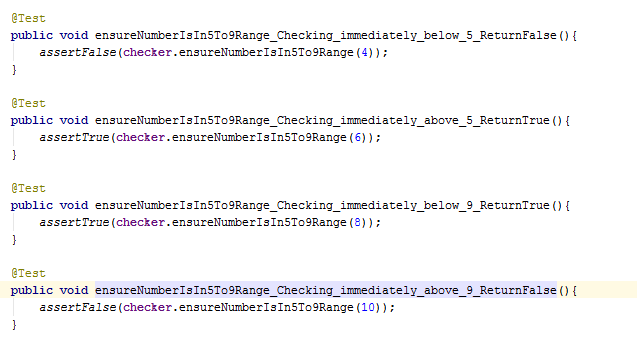
Taking a step back, we want to be really thorough we could write the following tests as well.
A test just outside the left bound. 4. False
A test just inside the left bound. 6. True

A test just inside the right bound. 8. True
A test just outside the right bound. 10. False


I define an interface to the method.

public boolean ensureNumberIsIn5To9Range(int numberToTest);

First I code up the 9 tests against the specified interface.

Execute all tests. They fail.

Now I start the solution code... I'm done when all tests pass.

I come up with a pretty standard if statement, using logical And and two return statements. The tests all pass.


However now I realise I could make this more concise and prettier for the reader. So I refactor the code to just use logical AND and simply return what it evaluated to the caller. Tests all pass.


Happy days.

Now I check the code coverage, just to be sure it meets targets. 100%. I'm done. Check the whole lot in.

Thinking in solution first approach

I'm going to promise to do some tests to get us code coverage, with a code coverage metric target of 80%. Management love code with a coverage of 80%.

I will just code up a if statement, with two boundary clauses anded together. Simple. Will then write a test that triggers the boundary clause. And another test that doesn't trigger the boundary condition so happy out.

Next I'll have a think about the interface, it's gonna be pretty simple in this case.

Open up my IDE. Fire in the interface, the algorithm and now I'll think about tests.


So looking at my code, I can see the branch (if statement). The first test I write, just takes any number outside the boundary condition. So I trigger the method with 15, expecting false. I run it, its passes and I get 75% code coverage. Wow I'm nearly there with just one test!

If I trigger the boundary condition on the if statement, then I can increase this figure. So I'll write one more test. This time I'm going to pass 7. Right in the middle of the boundary condition, I am really expecting it to pass.


I execute it. It passes. 100%!!!!!!! Happy days. Check the whole lot in. Home time.

But wait...
Did you spot the bug in the solution first approach? The upper boundary has been incorrectly coded... values of 10 will return true. It's a good thing this code wasn't used to control an auto mobile safety system, an aircraft or a train!

So I've got 100% coverage, but I'm still leaking bugs. Why?

The set of useful unit tests

We explored the set of useful tests in another article. In this simple example we see the set of useful tests consists of 9 tests. I should implement these 9 tests to ensure correctness of the code. The set of tests that gives 100% code coverage is just 2 tests. This is a significant minority of the tests I actually need to ensure correctness. Hence when reality throws in something we didn't test for, we find bugs, although I have 100% code coverage. You can see there is a large scope for bugs, even in this simple application when you test for coverage.

Spending time writing more automated tests around your top 20% of all uses cases that your users use, will give you a much greater bug count reduction in future releases. Spending any time increasing code coverage when you haven't got that 20% of your code base well tested, is waste.

Tuesday, 7 July 2015

Defining a good Unit Test suite

I measure test suites under 6 main criteria. The criteria are pretty hard and fast and there are key indicators to measure them. There is also an AND relationship between them. So if you can tick 5 out of the 6, the other one should be addressed.

  1. Trust. Tests pass when the component is ok.
  2. Comprehensiveness Majority of the ways of use for the component are covered by the tests
  3. Correct level of abstraction. Tests should be written to a stable, well defined interface. Unit tests faciliate refactoring.
  4. Language Tests should match the language of the problem
  5. Reliability. Tests fail only when the code is not ok.
  6. Independent Tests should be independent of other tests, methods and classes, in a pragmatic way. ie each test should only use methods that are "well used" in the public domain. This does not include data driven approaches.
  7. Libraries Don't test well used and independently verified libraries.

What defines a useful test suite is:

  1. A developer can be pretty sure, once the unit test suite passes, that no other functional issues will be found. We are happy to release the product after the automated suite passes.
  2. Majority of the problems are found at the unit-test level. For this our Fault Slip-through Analysis of our bugs indicates that the majority of bugs are found in the right level of test.
  3. The unit tests are a vital tool to help refactoring. I can do multiple run-test - refactor - run-test cycles, without making a change to the tests. The unit-tests are written towards the "thing" wrapped in an interface, and not just any method or any class.
  4. They reflect the language of the problem definition re using terminology the customer used. Ideally Customers should be able to understand the tests.
  5. When a test case fails, it points to an actual problem in the component
  6. Test cases shouldn't change when we change or extend the system, therefore I can trust them. Test cases are the guarantee that what worked yesterday, still works today. If we have common methods and utility classes referenced in our tests, that are changed as the system grows then we cannot depend on our tests. In other words, if I change my test code, who will test my tests?
  7. Libraries such as the extensive set of libraries in the JDK, databases like MySql, NEO4J etc are published by competent organisations and are heavily re-used in a lot of software settings. You can trust that their functionally works. Don't write tests that extensively test CRUD of database operations. You can trust that the Collections framework works. You may need to make an exception if you are using pre-release libraries or if they are libraries from your own organisation that you can't trust (i.e. it's your code that is really testing them).

What "smells" to measure that a unit test suite is useless:

  1. Developers don't trust the unit tests to verify the component. This means, more or less, that a developer isn't that confident to release the component based on unit test alone. We require a manual test before we are confident to release the product.
  2. Majority of problems are being found in later stages of testing. Our fault slip through Analysis is showing large numbers of bugs appearing in later phases of test, that could have been found in earlier phases.
  3. The unit tests are written at too low a level and now hinder refactoring. I change the internals of a component and several unit tests no longer compile, never mind that the don't run. Every method of every class has at least one unit test associated with it. Worse still, methods that should be private are public to enable testing!
  4. They reflect the terminology of the code - we see language of the solution in the tests. For example things like factories or other design patterns start appearing in the tests.
  5. Test cases regularly fail at random times during various runs. Failures are "false" because they were caused by some environmental or platform problem. For example a database service we needed wasn't started or the disk was full.
  6. All my tests depend on a test utility method I wrote a good while back and this utility method needs to be regularly changed when we add new features. Most times I add new tests, I have to change the utility method, causing a subtle change in all my tests.
  7. Lots and lots of tests that test POJO (Plain old java objects), lots and lots of tests that test whether data entry into the database was successful. Often tests are written due to inexperience and a need for coverage metrics. It may be fine to have one test that tests the connection to the database and ensures read/write works, but any more than that is overkill. For POJO's I recommend excluding them from code coverage altogether - there's no logic in there and test cases for the getters/setters are noise.


Updated 26th May, 2016

Updated 3rd June, 2016

Updated 23rd August, 2016

Updated 4th September, 2017

Updated 26th October, 2017

Updated 27th October, 2017

Updated 24th February, 2020

Wednesday, 1 July 2015

The set of useless unit-tests

This diagram depicts the sets of unit tests that exist.

What's immediately obvious is that tests are either considered useful or useless. There is no common ground. It's obvious that the set of useful unit tests is smaller than the set of useless unit tests, but not by much. 

Also you can see that you only need a fraction of the tests to get maximum code coverage, the set in blue. This set is a fraction of the total test set in either set.

What's not obvious is that the set of useful tests are more difficult to write because they require a good understanding of the problem. While the set of useless unit tests is relatively easy to develop because they require an understanding of the code. For most developers, it's far easier and less hassle to focus on the code, as opposed to the problem we are trying to solve.

If you just mandate developers to write unit tests, without much support from the people who specify the problem - inevitably they will end up writing tests from the set on the right. These tests, while you think you want them, are pure waste. Extra lines of code. At worst you have to maintain them and at best have to be aware of...

If you then mandate your developers to target code coverage, they will focus on the subset in blue, in the set on the right. This isn't the worst thing in the world. It means you will write less wasteful tests... thats' not a bad thing. However they are still waste.

If you have developers who are mature and experienced enough to write their tests in the set on the left, then you are really lucky. They are a very rare resource. The more of this set we complete the better. We will have less bugs in the future.

When you set a coverage target when writing great tests, there is a danger you write the least valuable tests. The 80:20 rule tells us that 20% of our code is run 80% of the time by our users. Or that users need just 20% of a component, 80% of their time. Then thinking of our users, we need to have tests to verify this 20% of the code base works, all the time. In other words you get most value ignoring 80% of the code base. 

So if time is a limiting factor and you are writing good tests, targeting code coverage isn't a good idea because it means that you are writing the least valuable tests.

Fragile Tests

Wednesday, 27 May 2015

There's a reason standups use closed questions...

Standups, done well, are an important part of a great teams' way of working. Here is a very good article on stand ups its not just standing up
Standups in a nutshell:
  • set a disciplined, defined and energetic start to the day.
  • Re focus yourself on your plan for the day
  • Re focus the team on the goal for the sprint
  • communicate with your team members. Hear what they are doing.

To help achieve these goals, typically we let standups revolve around three questions:
  1. What did I do yesterday?
  2. What will I do today?
  3. What do I need help with?
These questions have very specific answers that should relate to the story or task level your team is working on. If you keep your team to just answering these three specific questions directly, then your standups will be short and energetic. Team members should be reporting this to the whole team.

Getting your team to stay on point

There are a couple of things to try.

One experiment to try and stay on point is to get the team to prepare a (6x4) Q card with the 3 questions specifically answered. Each member then reads out their answers at standup.

Another experiment is to pair up team members. Before standup, each member reports their answers to the three questions to their partner. The partner then relays this at standup.

Warning signs and things to try in your standup

  1. People wandering into problem solving mode in the standup.
    Park the discussion. Resume after standup with just the interested parties.
  2. People reporting to the scrum master or the product owner.
    Try to report to the whole team.
  3. People not listening to their team members.
    Try agreeing a team value. If you are not listening to me, I'm not listening to you.
  4. People joining the standup late and leaving early, once they have given their update.
    Discussion with the team member and agreement of a team value to take full part in the standup should help here

Tuesday, 26 May 2015

Team Definitions

In this short article, I want to define and clarify some of the terminology surrounding software teams.

Collection Names

Let's define four collections of people
  1. Group 
  2. Team
  3. Self organising team
  4. High performing team

Group

  1. A number of people who have some common attribute or skill that allows them to be classified together. For example Java developers, scrum masters.

Team

  1. Defined boundary for the members
  2. There is a common purpose
  3. Shared experiences

Self organising team:

  1. Defined boundary for team members
  2. Recognized leader
  3. Subtle control
  4. Diverse members
  5. Transforming exchanges
Taken from Leading a Self-Organizing Team

High Performing Team Definition

  1. Delivering business value all the time
  2. Will adapt to suit the business
  3. Continually Improving
  4. Happy to work together

Wednesday, 29 April 2015

Scrum ceremony cheat sheet

Daily stand up

Purpose: For the team to recommit daily and evaluate where our sprint plan is. Individually each member informs other team members what I am doing and where I can get help
When: Daily, in the morning
Who: All team members. PO might be an observer.
Inputs: Sprint backlog up to date to reflect members input.
Output: Everyone knows what everyone else is working on and where they can get help. We know what we need to work on to secure the sprint goal

Sprint planning

Purpose: Set the scope of work for the sprint.
When: First meeting of every new sprint.
Who: All team members and PO
Inputs: Groomed and estimated backlog.
Output: A sprint backlog. Sprint started. Commitment from team.

Backlog grooming

Purpose: Adjust the backlog estimates and break up big stories/epics.
When: 1-3 times per sprint. 1-2 hours per session
Who: All team members and product owner
Inputs: A selection of X stories from the top of the product backlog
Output: A estimated subset of stories on the backlog. Full backlog will not be costed.

Release Planning

Purpose: Estimate of the size of the backlog on that date.
When: half to one full day, every so many sprints
Who: All team members and product owner and coach (optional)
Inputs: Ordered, populated backlog (as much as possible).
Outputs: A fully estimated backlog.

Retrospective

Purpose: Reflect on how we worked in the last sprint so that we can introduce improvements in the coming sprint.
When: Last meeting of the sprint, after demo and the sprint is closed.
Who: Team members. Product owner optional.
Inputs: none required
Outputs: Actions for each team member to implement

Demo/Sprint review

Purpose: To show off the teams work and get feedback on work complete.
When: At the end of the sprint. 2nd last meeting.
Who: Team members, Product owner. As many other stakeholders as can attend.
Inputs: "Done" stories.
Outputs: A list of feedback from stakeholders on the software just shown.


Updated 15th April, 2016

Monday, 27 April 2015

Great tests are like great wine, great architecture is like great cheese

A great automated test suite is one that allows you to change the internal architecture of the system in any way, with confidence that the system still behaves the same towards its clients after the change is committed. The more the system changes over time, the more the test proves its value over and over again. The older a great test gets, the more value it delivers in facilitating change. So a great test gets better with age. Very much like a great wine.

A great architecture is one that makes the system do what it needs to do and makes it easy and cheap to add many new features. Unfortunately there are always trade offs in the direction of change that an architecture allows. Ultimately the architecture of a product, with some very limited exceptions, becomes the limiting factor in change. In this respect its like a great cheese, it will age well for the first while, but eventually degenerate and rot.

Thursday, 23 April 2015

The -Iliities

In application development, there is a lot of talk about the -ilities. The purpose of this article is to gather a few definitions and explanations of the -ilities together.

Upgrade-ability - the ability to upgrade software, without interrupting service. Can be referred to as "0 downtime" upgrade.

Horizontal Scalability - The ability to increase or decrease capacity of the system by adding or removing instances of services. Ideally, we would like to achieve this without service interruption.

Vertical Scalability - The ability to increase or decrease capacity of the system by adding or removing threads to the running instance of the service. Or to put it another way, how much can the component itself stretch before we have to add more instances of the component.

Availability - The amount of time the service is available to users. Commonly measured % time uptime per year, for example 99.999%. This means the service can be unavailable for a total of 5.26 minutes per year.

Stability - the amount of time the system is running as expected. Less scientific to calculate than availability.

Capability - the list of features that the system/service supports.

Capacity - the load limitations of the system/service. This can be scientifically measured, but different metrics apply for different types of services. For example for certain services the number of operations per second may be important. For other services the amount of data (Bytes per second) processed per second might be important.