Thursday, 23 April 2015

The -Iliities

In application development, there is a lot of talk about the -ilities. The purpose of this article is to gather a few definitions and explanations of the -ilities together.

Upgrade-ability - the ability to upgrade software, without interrupting service. Can be referred to as "0 downtime" upgrade.

Horizontal Scalability - The ability to increase or decrease capacity of the system by adding or removing instances of services. Ideally, we would like to achieve this without service interruption.

Vertical Scalability - The ability to increase or decrease capacity of the system by adding or removing threads to the running instance of the service. Or to put it another way, how much can the component itself stretch before we have to add more instances of the component.

Availability - The amount of time the service is available to users. Commonly measured % time uptime per year, for example 99.999%. This means the service can be unavailable for a total of 5.26 minutes per year.

Stability - the amount of time the system is running as expected. Less scientific to calculate than availability.

Capability - the list of features that the system/service supports.

Capacity - the load limitations of the system/service. This can be scientifically measured, but different metrics apply for different types of services. For example for certain services the number of operations per second may be important. For other services the amount of data (Bytes per second) processed per second might be important.

Thursday, 26 March 2015

Conversations - What version?

Dev 1: What version of the platform are you using to test your component on your branch?

Dev 2: I'm using version 1.2.3.

Dev 1: Great, I'm also using version 1.2.3.

Dev 2: One thing though. We had to edit the supporting utilities script on the server that was part of the 1.2.3 build. We are waiting for a 1.2.4 build that has the update in it, but it didn't get a green test in CI, so it won't be in the main track today.

Dev 1: So you are not on version 1.2.3, you are on a newer version of software than 1.2.3, that is based on 1.2.3. If I merge in your changes, how can we deliver this to the customer?

Dev 2: We always edit the src on the deployment in order to work around bugs. We usually update the installation instruction afterwards with any of these updates.

Dev 1: I think we need to have a discussion about version control.

Wednesday, 4 March 2015

Coaching v Mentoring v Leading

Coaching: 

Helping another person or team or group to attain higher performance or arrive at a solution. The coach will engage the coached in a process that helps them discover and arrive at their own solution. The coach may or may not have actual expertise in the area, it's the disciplined process that the coach brings to the table. A big aspect of coaching is that the coached gives the coach permission to coach them. The coach is a "servant" to the coached. The coached chooses their coach. 


Mentoring: 

This is where one party, who has some mastery or skill or experience, helps another party acquire these skills and experience. Normally this is done in a one on one situation and using informal means of teaching for example pairing and peer reviewing and general communication during day to day work. The mentor pushes their knowledge on the mentored. Often the mentor is assigned; the mentored has no choice in the matter. 


Leading:

When a person engages, convinces and motivates others to follow them. It is a factor of Vision, Trust and Respect. Vision: where we will get to? The vision attracts people to engage. Trust: People don't have to be micro-managed or instructed how to attain the vision. Respect: people are empowered to do what it takes to realize the vision. Leading should be a push relationship, but the leader needs to create the environment where followers are willing recipients. There are many bosses and managers who are not leaders. They have employees, not followers.

Wednesday, 25 February 2015

"Internal" Bugs

Software is full of issues. Tests explore software and uncover some of these issues. Sometimes we won't write enough tests, due to time constraints and reasonable effort already expended. So some of these issues are found by people outside our team - ie our customers.

And its perfectly reasonable of us to provide a bug tracking system for all external stakeholders so they get feedback on their bug as it goes through production.

But why do we record issues we find ourselves, as bugs?  

I've often heard that bugs are actually a good thing! It must mean the customer is using our software. Surely the customer is expecting a few bugs. Right?

Wrong. Bugs are bad. Always bad. Every time a customer finds a bug, the effect on our reputation from the customers point of view as software developers is negative. Even if we label the software an Alpha or Beta release just to lower their expectations, they still get a little disappointed when things don't work. Even if we write the bug ourselves before the customer finds it, we still suffer reputation loss. Bugs are expensive in terms of time and money for the customer and we are charging the customer more for they actually already expected.

Analogy: I employ a cabinet maker to make me a new chair. The apprentice and the master craftsman take the measurements, cut the pieces, carve the design and begin the assembly. At one point they figure out that piece X doesn't fit slot X. Do they ring me to tell me that there is an issue? Do they just fix it up? How about when the chair is delivered and I find that it wobbles? There is no difference for software.

So in software development, why do we make public our own sloppiness in what we deliver? Bugs are one indication of sloppiness.

In a scrum team, we must try and establish the culture of honest craftsmanship. If opening the code for a user story, uncovers an issue we need to fix that issue as a task on the story. We must ship a good quality product. So often this occurs right at the end of the sprint. And so often we force ourselves to write the bug, but ship the code anyway. When this happens you have to ask: "Why do we ship sh*t?

As scrum masters, we need to be disciplined and honest with our team and customers. We are done and ready to ship if we are done and there are no outstanding issues. Otherwise we are not done

To be true to software craftsmanship and our profession, we need to have a 0 tolerance to bugs.

Tuesday, 3 February 2015

Delivering too early...

This is a transcript of a conversation between 3 developers on a real life project.

Background: Dev 1 releases a product to the deployment without integration testing. As soon as deployed, the system is broken. The pressure is on to resolve and repair the deployment. So Dev 2 agrees to help Dev 1 troubleshoot with a view to sorting it out. Dev 3 is their other senior team member, who takes part in the conversation.

Dev 1: OK I have seen what the problem is. My merge wasn't completed like I thought it was and the impacts are missed in the master branch. So it's not in the RPM we delivered.
Dev 3: So lets back out the packages that include your changes.
Dev 1: I really want it to stay in.
Dev 3: Is that really a good idea. It's not tested. It's not really professional to keep it in there, is it?
Dev 1: Ya, well its tested locally and this is valuable feedback for me and the code is finished. You have to crack a few eggs to make an omelet and all that.
Dev 3: OK. Your call.
Dev 1: One other thing, Dev 4 actually made the update to this component. I'm not entirely sure what he did, but there are 4 unit tests failing now. He never updated the unit tests.
Dev 3: OK, so you are still leaving the component in the build? Are you going to remove them or fix them up?
Dev 1: Well I don't know how to fix them up right now. But I'm definitely leaving the rpm in.
Dev 3: So what are you proposing? Commenting out the test cases?
Dev 2: No, we are going to comment out the assert statement at the end of the test case.
Dev 3: ???WTF? So the tests will just pretend to pass?
Dev 2: we want to keep the coverage value high.
Dev 3: <Insert swear word here> lads, that can't be the right thing to do.
Dev 1&2: Code coverage is watched by management, it can't reduce!
Dev 3: I'm not sure I want to hear this. Not sure whether believing the lie or knowing the truth is better!! [laughter all around]

We see lots of dysfunction above. Dev 1 definitely isn't persevering to take total ownership of the product that they have assumed responsibility for (the person doesn't know how to fix the tests correctly). Dev 2 has probably suggested the worst possible solution to the failing tests problem, because he wants to make sure the teams' product code coverage statistic doesn't decrease as it's being watched by management (but he is doing it in a very unprofessional way). Dev 3, on the face of it might look like the best guy here, but that person hadn't the bravery to make sure the right thing is done. Dev 4, the guy who actually made the original code has ignored valuable test feedback, either by not running or ignoring the failing tests.

Ultimately we have three developers who come to the wrong conclusion, despite having the right conversation. There is little excuse for not backing out the package and re-introducing it to the main delivery when all testing is satisfactorily complete, either by Dev 1 or Dev 4. The main track delivery is not the place to be getting initial feedback.

It's interesting is that the management code coverage target drives probably the worst possible behavior with unit-tests - False positives just to keep a coverage figure. When coverage is a target, you have to work hard on the culture of your developers.

Tuesday, 6 January 2015

A brief look at component based teams...

This is an expression of my observations of the challenges I see teams facing.

For our organisation to be agile, we have an explicit need for the "Vertical slice" team. Where every team can make updates across the system, pretty much independently of other teams. Nothing, or at least no other team, gets in the way of progress of the "Vertical slice" team! But in the real world we often shy away from the Vertical team from both a line management and a technical leadership point of view and we continue to form component based teams.

Management are tasked with staffing teams with enough competence to get the job done. When focusing on a component, it is far easier to tick competence boxes on the fewer technologies. Also certain in vogue technologies' developers command a kings ransom. It's just financially impossible to have one of those guys in every team.

For developers, the "money" is in being an expert in whatever technology is currently "hot", so developers have a inherent incentive to become an expert in relatively few technologies. The best way to become an expert is to focus entirely on that technology.

The component based team:

Pros
  • The most "natural" way for most organisations to setup its' teams.
  • Scope of the teams' responsibility is small so they have excellent technical focus. There are a few technologies that the team works intimately with, all the time. Line mgt and developers are happy.
  • Team members can become true experts in an area or technology.
  • Can build out a "complex" component out of sophisticated "niche" technologies relatively quickly.
Cons
  • That team only knows a small part of the system. They are effectively limited to working on that part of the system.
  • The team can have the illusion of being successful in a product that is failing
  • There is a big "tax" when moving people or other teams onto or off this component.
  • Those people become key to the organization even though they might not be domain experts in the business. The team can make themselves indispensable to the organisation.
  • Component becomes impossible to fundamentally change its technology as the business changes. A component team is loyal to the technology because they have so much expertise. The business adapts its solutions to fit the technologies employed.
  • Long term waste/expense. Over medium to long term you end up building parts of a component that are "nice to have" and may never be used by the business.
  • Perceived "God" complex develops over time. And Conways' Law applies.

Monday, 5 January 2015

Happy new year 2015

Its been a while... Had a busy 6 months since my last post. With the new year and all that I'm back and will be creating some articles. The main aim of this blog is to share some observations and knowledge, while re-enforcing my own learning.

The aim is at least 1 per month, as per last year. While I haven't been publishing, I have been gathering some ideas for articles. I hope to add some book and video reviews as I go.

Looking forward to a great 2015.

Friday, 13 June 2014

Scrum master tools: Effective Whiteboards

The whiteboard is one of the most powerful tools of a co-located scrum team. A picture speaks a thousand words for promoting understanding within a team. True, there are thousands of cool drawing applications out there. Some are free and some have some license cost. And these are great collaboration tools, especially for a non-collocated team. But for the co-located team nothing beats a good quality, fully equipped whiteboard.

There is no other tool with as low a competence barrier for use as the whiteboard. Whether you are the CEO or the technology expert, old or young, rich or poor, chances are you have basic writing and drawing skills. This means you can use a whiteboard. 

The whiteboard is a great aid to the creative process. You don't have to go searching for the "right" icon or diagram. There's no chance of it crashing just at the eureka moment. Its always on. It's easy undo/change the diagram. Its easy to save (take a photo using your phone!).

Plus its a great break from just sitting around the computer on the desk. 

In my opinion, one of the things a scrum master has to do is get their team using the whiteboard effectively. The following tips are vital

Guidelines

Make sure the whiteboard is near the team. Preferably right beside. Preferably only for use by your team. Unrestricted and easy access are vital.

A clean whiteboard is an invitation to the team for content. Make sure the whiteboard is always clean. If no one is using the whiteboard at that moment in time, it must be clean. . There are two ways you can achieve this. Firstly have a rule in your team to always wipe the whiteboard after they are done. And at the end of the day or start of the day, clean down the board yourself. Never tolerate those that write "Do not erase". Erase immediately.

Fully equip your white board: Make sure you personally source: Markers (various colors), Magnetic eraser and white board cleaning fluid or spray. Daily check the white board for markers and that it is clean.  

Practice with your team: It can be daunting to start using the whiteboard for some team members, even though they have the basic skills. Take time to help your team to articulate their ideas on the board.

Practical advice

I favour metallic based whiteboards. These tend to have a higher quality surface. From time to time, magnets are useful for planning with index cards etc.

Communication advice

Team need a common language to understand each others drawing. For me, working with mainly Java and OO based teams, its mainly UML diagrams (class, object, sequence diagrams. I can recommend "UML for Java Programmers" by Uncle Bob. Flow diagrams are also useful for algorithmic solutions. And there's always free form diagramming - come up with your own representations, just be sure to explain it to the rest of the team what the boxes and arrows represent! 

Happy white boarding.

Friday, 2 May 2014

Retrospective Planning Roulette

This is a planning game to help organize team retrospectives with a difference. Its a great activity to run in a scrum master community of practice when discussing retrospectives.

Required:
Copy of "Agile Retrospectives: Making good teams great" by Ester Derby and Diana Larsen
Queue Cards
Colored Markers
Whiteboard
Magnets or bluetack
4 Scrum masters (I had enough Queue cards for 4, if you have more just write more cards)

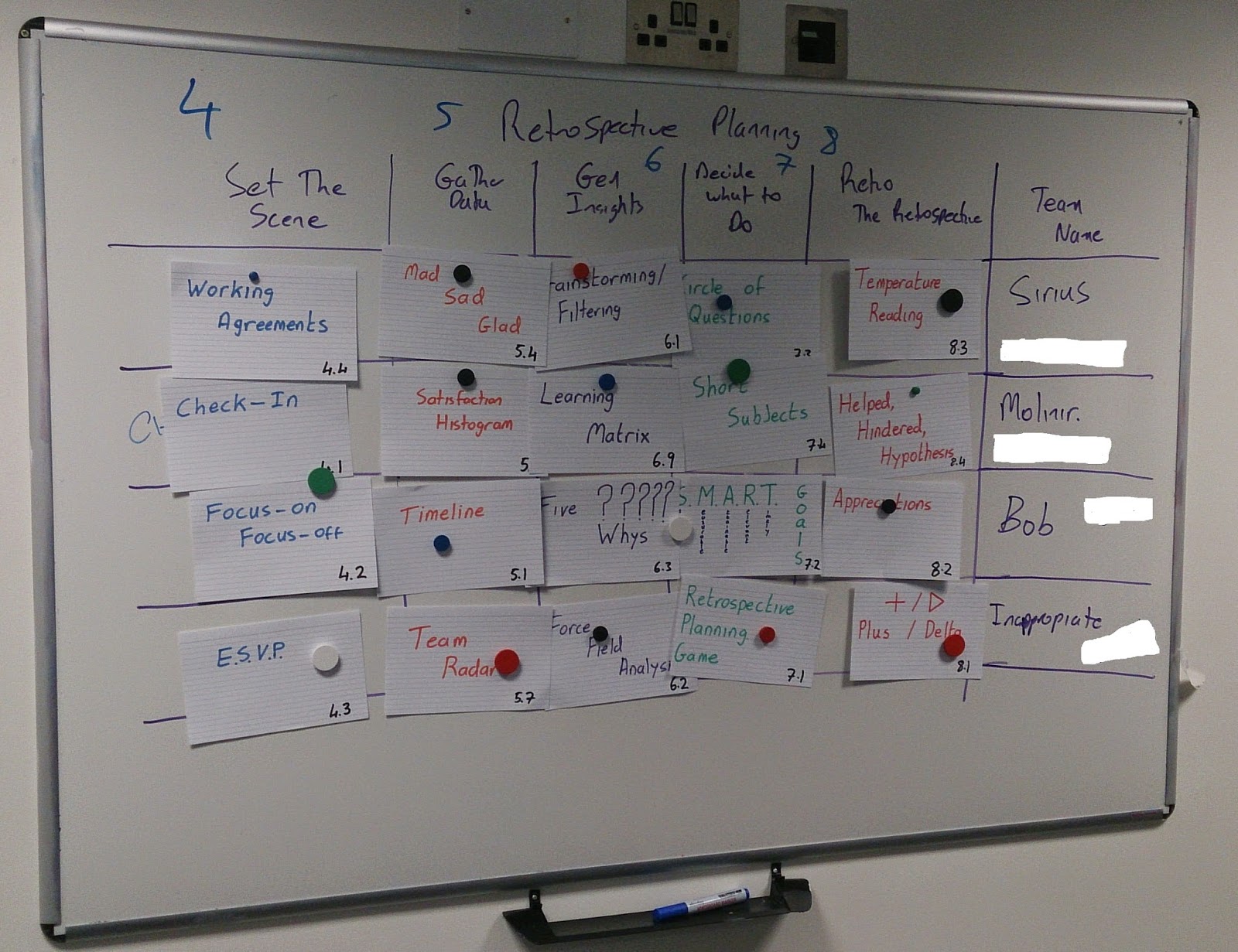
You will plan a number of different 5-stage retrospectives for all your teams at the same time. The book is organised into activities that support each stage of the retrospective.

Instructions:
  • Write out the exercises from the chapters 4, 5, 6, 7 and 8. It helps if you use colors. These are exercises that support: Setting the scene, Gathering Data, Generating Insights, Deciding what to do and Closing the Retrospective.
  • Now lay all the cards out on the table in columns according to chapter. See photo.
  • Next you lay out the whiteboard. So across the top put the 6 columns. One row per team. Now you are ready to play. Here we have 4 teams.
  • The next step is to get the scrum masters to choose from the laid out cards which activities they will use to run the retrospective. It doesn't matter if they don't know what that activity is as its described how to do it in the book. All they need is on the queue card.
  • You end up with something like this: Here you have 4 teams retrospectives planned out. For example 

  • Now each scrum master has an agenda put together. The instructions for each task are in the book quoted above. 
  • Its good to follow up this activity to see how did the scrum masters get on. And you can easily re-run it to get another retrospective agenda filled.
  • FYI after we had done this I found this website that does the same thing with an online version. http://www.plans-for-retrospectives.com

Thursday, 10 April 2014

Failure in scrum mastering and project management.

Project management typically tries to identify failures (risk) and takes actions to avoid those from happening.

In scrum mastering, we let the team fail and fail as fast as possible. We then help the team to learn from that failure.